filter_list
Nothing found
-
key API administration expand_more
-
bolt Simple API expand_more
-
bolt Transactional SMS expand_more
-
campaign Promotional SMS expand_more
-
account_balance_wallet Credit balance expand_more
-
-
tune Advanced API expand_more
-
bolt Transactional SMS expand_more
-
campaign Promotional SMS expand_more
-
forum Channels expand_more
- account_balance_wallet Check credit balance
- sell Message price information
-
history Version 1.0 expand_more
-
bolt Transactional SMS expand_more
-
campaign Promotional SMS expand_more
-
-
-
hub Integration API expand_more
-
code_blocks PHP SDK expand_more
-
download Installation expand_more
-
mail Message expand_more
- tune Configurators
- fact_check Number checker
- schedule Schedulers
-
history Version 1.0 expand_more
-
download Installation expand_more
-
mail Message expand_more
-
send Sender expand_more
- public Country
-
-
-
password OTP API expand_more
-
outgoing_mail Email to SMS expand_more
-
block Blacklist expand_more
-
contacts Address book expand_more
-
payments Pricing expand_more
-
link URL shortener expand_more
Sending message to notification admin
You can send notification messages administrators via Advanced API. All you have to do is to enter specific administrator
identifier into the admin parameter. You can find this identifier in the admin manager.
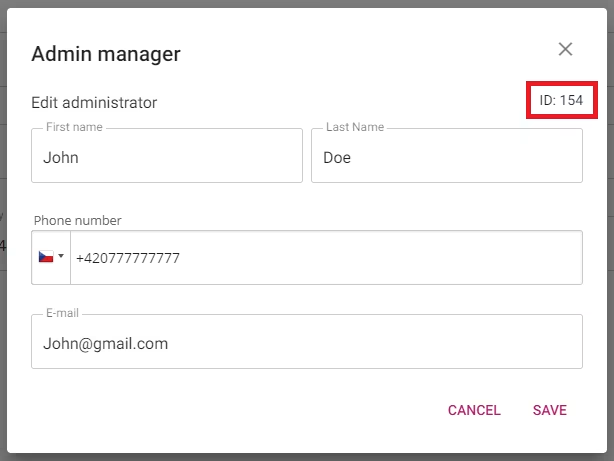
Example of the request:
It is possible to add variables in the text that will be replaced by specific admin values before sending the message.
The final message then looks like this:
Here is the complete list of variables:
| VARIABLE | MEANING |
|---|---|
<first_name> |
First name |
<last_name> |
Last name |
<phone_number> |
Phone number |
<email> |
Email address |
Was this page helpful?
Thank you for your feedback.