Delivery confirmations and incoming SMS
What arrives at your address
BulkGate reports two things back to you: how your sent messages ended up, and what people replied. Both arrive as an HTTP request to the address you have set.
| What arrives | How you recognise it |
|---|---|
| Delivery report | The status parameter with a status code and the smsID of the sent message |
| Incoming SMS or a reply | The status parameter with the value 10, the sender in from and the text in message |
The request comes in by HTTP GET, so you find the values in the query string.
At high volumes the bulk variant pays off: instead of a request per message, a single POST request arrives with an array of records in JSON. It is described on Bulk delivery confirmation.
Where the address is set
You set the address yourself in your application detail — on the Settings tab,
in the Web hooks part, on the Delivery reports card. The URL delivery reports field in the window that opens takes an address starting with http://
or https://.
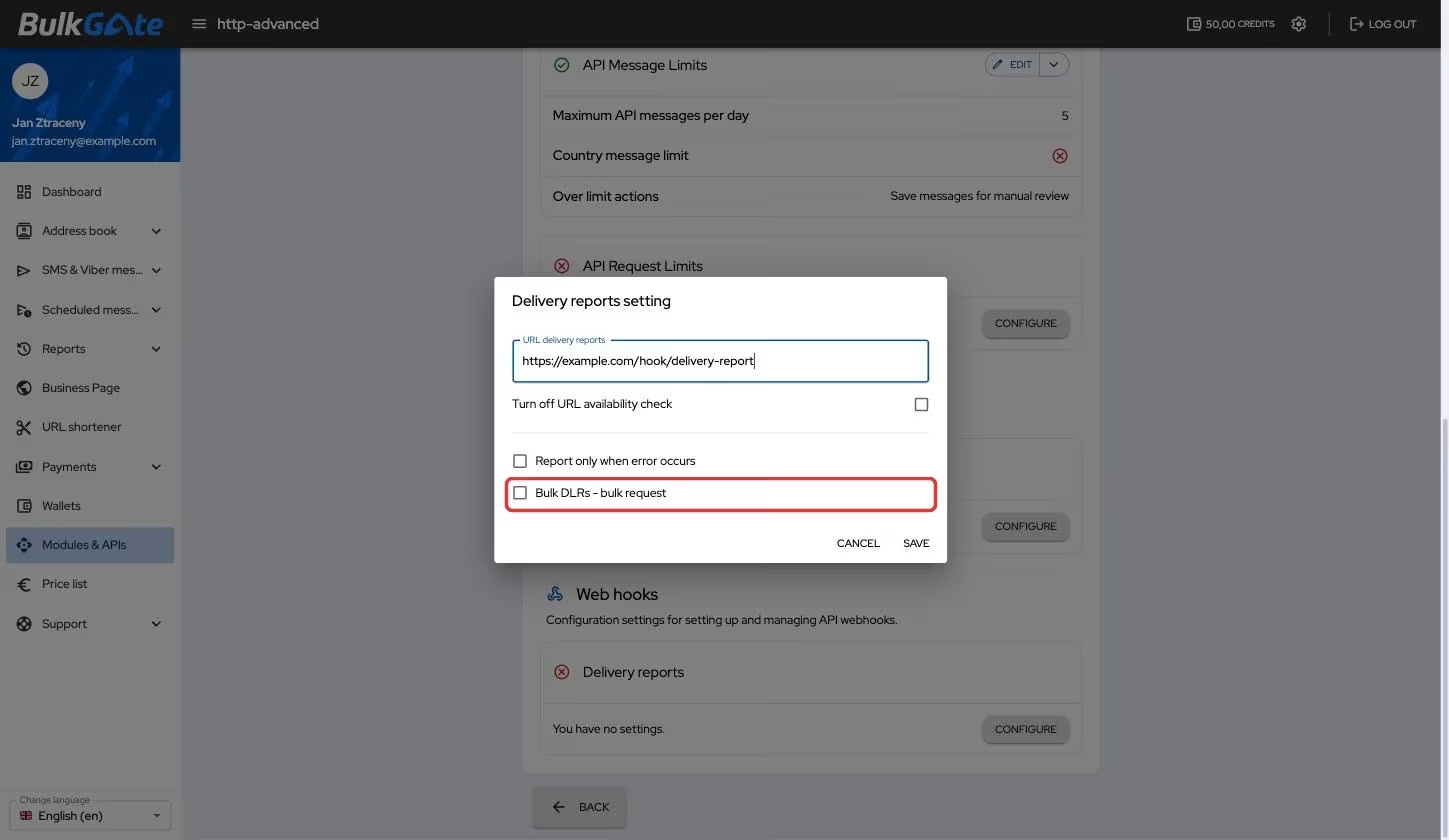
Leave the Bulk DLRs - bulk request checkbox off — with it, delivery switches
to batches sent by POST and
Bulk delivery confirmation
applies instead.
The whole procedure including the other options is described on the Webhooks page.
Delivery report parameters
| Parameter | Value |
|---|---|
status |
The status code of the message — see delivery statuses |
smsID |
The unique ID of the message |
price |
The price of the message in credits |
channel |
The channel the message went through (sms, viber, whatsapp, rcs and others) |
date |
The time of sending and of delivery separated by a semicolon, in the CET timezone |
The date value has the form YYMMDDHHMM;YYMMDDHHMM — for example
1812141317;1812141318 means sent on 14 December 2018 at 13:17 and delivered
a minute later.
Incoming message parameters
When status holds the value 10, this is not a delivery report but a message
from the recipient. It arrives with a different set of parameters:
| Parameter | Value |
|---|---|
status |
Always 10 |
from |
The sender's phone number |
to |
The recipient's phone number, that is your number |
message |
The text of the message in UTF-8 |
channel |
The channel the message came through |
smsdetails |
Details including the protocol used and the time of receipt |
Delivery statuses
| Code | Meaning |
|---|---|
1 |
The message was delivered |
2 |
The message is queued on the operator's side — the recipient is unavailable at the moment and delivery will be retried |
3 |
The message could not be delivered — the recipient is unknown or permanently unavailable |
10 |
An incoming message or a reply, not a delivery report |
13 |
The message was read (Viber only) |
Status 2 is not final — another request with the resulting status arrives for
the same message later. Expect to see the same smsID more than once.
An example of processing
The script tells a delivery report from an incoming message by status and
writes each to its own log:
The address has to answer quickly and with the status code 200. Slow or
failing processing holds up the delivery of further reports — so push any heavy
work onto a queue and acknowledge the request right away.
Thank you for your feedback.