Nothing found

You are viewing an older version of this page.

Open current version

Installation to Nette (PHP SDK 1.0)

The easiest way to install bulkgate/sms into a project is by using Composer via the command line.

composer require bulkgate/sms

The package includes extensions for Nette framework DI container.

DI Extension

Register the extension to the DI container via NEON

extensions: bulkgate: BulkGate\Message\Bridges\MessageDI\MessageExtension bulkgate: application_id: 451 application_token: NKN02TWE6NfBkfl-your-secret-token-Wf05GaqLIWLW4aBj

which gives you the class `BulkGate\Sms\Sender` as a service you can request. See how to get API access data.

<?php declare(strict_types=1); namespace BulkGate\Presenters; use BulkGate, Nette; class SdkPresenter extends Nette\Application\UI\Presenter { /** @var BulkGate\Sms\ISender @inject */ public $sender; public function actionDefault() { $this->sender->send(new BulkGate\Sms\Message('447971700001', 'test message')); } }

Tracy

At the same time, you'll get the extension for Tracy panel
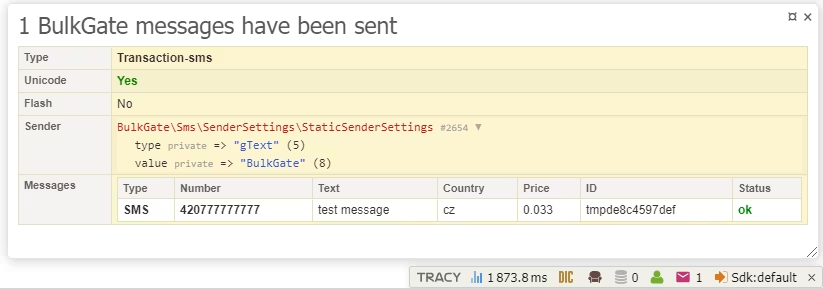
bulkgate-sdk-tracy

To manually add the extension, follow these steps.

/** @var BulkGate\Message\Connection $connection */ Tracy\Debugger::getBar()->addPanel(new BulkGate\Message\Bridges\MessageTracy\MessagePanel($connection));
Was this page helpful?