Nothing found
-
Address book
-
Campaigns
-
SMS
- Sender ID profile
- Sender type
- Unicode
- Message concatenation
- Dedicated number and replies
- How to register a sender
- Sender ID shows as a number
-
Text sender ID registration
- Albania
- Australia
- Austria
- Belarus
- Bosnia and Herzegovina
- Bulgaria
- Croatia
- Czechia
- Finland
- Ghana
- India
- Ireland
- Israel
- Italy
- Ivory Coast
- Jordan
- Kenya
- Montenegro
- Morocco
- Mozambique
- Nigeria
- North Macedonia
- Philippines
- Qatar
- Romania
- Russia
- Serbia
- Slovenia
- Spain
- Thailand
- Turkey
- Ukraine
- United Arab Emirates
- United Kingdom
- United States of America
- Prohibited SMS content in the USA and Canada
- DND (Do Not Disturb)
-
Mobile Connect
-
Partner programs
-
Integrations
-
E-commerce modules
-
Make (ex Integromat)
- vTiger
-


SMS showing a number instead of your sender ID?
When recipients see a phone number, a short code or a generic text such as "INFO" instead of your text sender ID, the message went out with a different sender than you wanted. The message is usually still delivered, just under a different name. Below are the most common causes and what to do about them.
How do I find out which sender the message used?
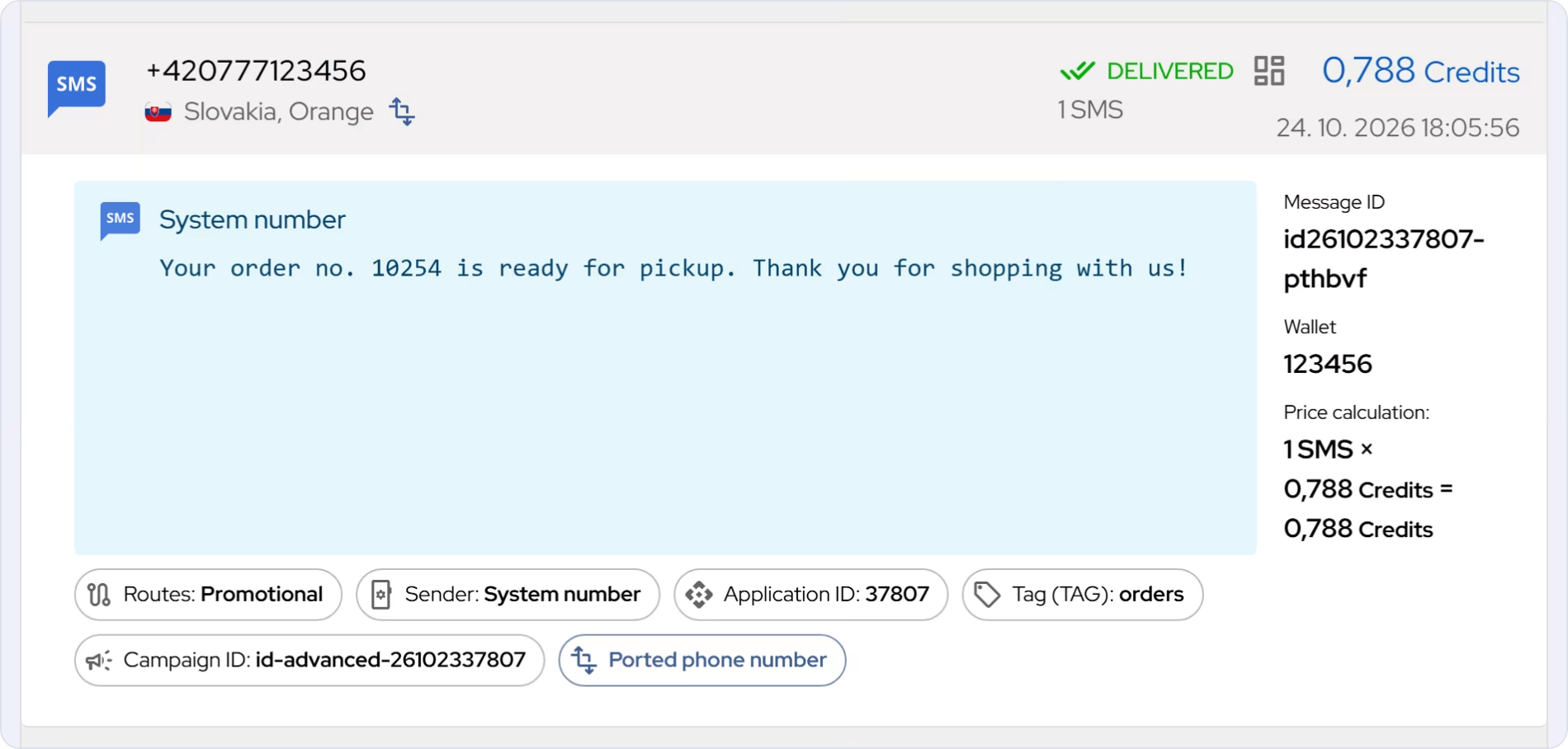
Open History in the portal and click the message. The Sender label shows the sender type and value the message was actually sent with. Note down the Message ID as well, you will need it if you contact support.
- The sender in History is not the one you wanted: the cause is in your settings. Go through points 1–4.
- History shows the right sender, but the recipient sees something else: the operator replaced the sender. See point 5.
1. The sender ID is not approved yet
In countries where registration is mandatory, a text sender ID can only be used once the operator or the regulator approves it. Until then, the message goes out from a system number, or the operator does not deliver it. In Austria and Spain, for example, operators block unregistered sender IDs.
What to do: check in the price list whether the country requires registration and follow Text sender ID registration.
2. The approved sender ID is not selected
Approval alone changes nothing. Your messages keep going out with the sender set in your campaign, module or API.
What to do: in a sender ID profile, set the text sender ID for the country and select the profile in your campaign, module or API.
3. The name does not match the registration
The operator compares the name character by character. "MyShop", "MYSHOP" and "My Shop" are three different senders. A name longer than 11 characters, with accents or without a single letter does not get through either. The message then goes out from the system number.
What to do: enter the name exactly as it was approved. The rules for text sender IDs are in Sender type.
4. The sender type is not available in the country
If the chosen type cannot be used in the recipient's country, the message goes out from the system number. This also applies to an unverified own number.
What to do: check in the price list which sender types the country supports.
Sending through the API?
The most common mistakes in the request:
- type and value are swapped: the type belongs in
sender_id(gText,gProfile…), the name or profile ID insender_id_value, - with
gProfile,sender_id_valueholds the profile name instead of its ID.
You will find the correct format in the SMS object.
5. The operator replaced the sender
Some operators replace the sender even when the message was sent correctly:
- Austria: if there is doubt about a sender ID from the RTR register, the operator may replace it with "Unbekannt". More in Registration for Austria.
- Bulgaria: a sender ID that is only whitelisted is rewritten to a shared short number. More in Registration for Bulgaria.
- Other countries: the operator may replace an unregistered sender ID with a generic text or a number.
What to do: send us the message ID and we will check it with the operator.
What to send to support
If you have gone through the points above and the sender is still wrong, write to us through the contact form, ideally from the e-mail you log in with. Send us:
- the message ID (at least one, ideally three to different numbers),
- the recipient's country and operator,
- which sender you expected and what the recipient saw,
- how you send: portal, module or API,
- for the API, the full request without the API token.
Frequently asked questions
The message went out from a system number. Was I charged?
Yes, the message was sent, just with a different sender. You can see what it cost in the message detail in History under Price calculation.
How do I check the sender before a campaign?
Send a test message to your own number in the target country. Then check the Sender label in History and what actually appeared on the phone.
Thank you for your feedback.